Ads 468x60px

Pages

Tampilkan postingan dengan label my. Tampilkan semua postingan

Senin, 10 Februari 2014

How Do I Download or Upload Pictures or Videos from my Camera

This question comes up a lot. A new or used camera owner may run into camera software issues. Theyll plug in their camera, but for some reason their computer fails to see or recognize the camera. Another problem is they may lose or may never have had the USB cable or needed software that came with the camera. Is there any other way to get the photos or videos off the camera and onto their computer?

First of all keep in mind IMO the only reason that the camera companies include a capability for cable download is to get you accustomed to using their bundled software that came with the camera. In most cases this software is rather pitiful, again IMO. If you absolutely must use photo organizing or editing software, there are much better freeware options available than what came with your camera (a future blog post is brewing).

But as a solution to downloading your photos, I highly recommend that you instead consider using a card reader to move the photos or videos to your computer. Card readers do not require software (although Windows 98 and earlier may require drivers), are very inexpensive, are much faster downloading files from the camera, do not use the cameras batteries during the download, and are much less prone to file corruption of the photos during the download. Really, it would be better for the camera user if one of these was included with the camera instead of the cable and bundled software.

Portable SD Card Reader/Writer

"All in One" Multi-Card Reader/Writer

You place the cameras card in the reader, plug the reader into the USB port, and your computer sees it as a hard drive. You simply copy/paste or drag/drop your photos onto your hard drive. For this simplicity, most professional photographers utilize card readers exclusively. Youll save yourself a lot of heartache if you convert to using one of these.

Here are examples from Amazon. Dont be fooled by the cost. Some of the most inexpensive ones work just fine. But make sure that you do read the reviews first before purchasing. Also make sure that you get a reader that is clearly stated capable of reading your card, particularly if you use SDHC, XD, CF, or MS cards.

For international readers of this blog, and even those in the US, heres another source for card readers (free international shipping too :-). I use the $1.95 portable SD/SDHC card model (SKU7230), and it works great. Note that the free shipping can take up to three weeks though as theyre located in Hong Kong.

Now go throw away that cable and go download your photos.

Read More..

Jumat, 10 Januari 2014

My Favorite Cars

Below are 3 of my favorite cars :
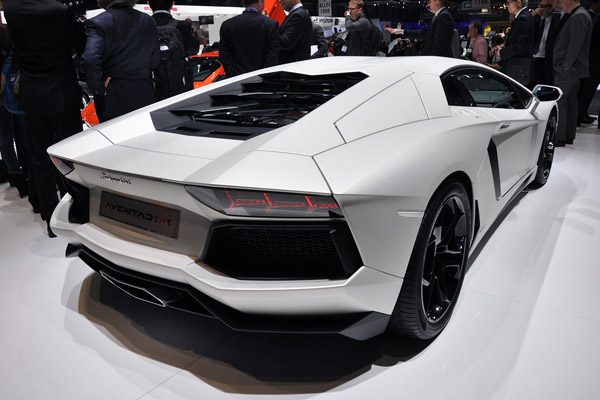
1 - Lamborghini Aventador - I dont like its back, I personally think its back is ugly.
2 - GTE Evora - It looks very cool. I like its sharp shape with little curve. Perfect sides and back view, front view is not so good.
3 - Lotus Elise - Cute. Full of curve, less sharp (Not should me because I am Z, the alphabet "Z" has no curve. I am like cool instead of cute), but I dont know why I still very in love with its cute shape, love this car!

I wondering they can drive into car-park in shopping complex since their bumper is quite low, maybe need to change a bigger wheels?

Fully imported car in Malaysia have to pay tax for Extra 200% .(100% car price + 200% tax).
I saw road tax Malaysia for Lamborghini are RM8000, RM16,000, and RM18,000.
Here are some crazy car interior designs pictures :


Above is Lamborghini Aventador
Below is GTE Evora


Below are Lotus Elise

Read More..

Senin, 05 Agustus 2013

Lock My Computer Desktop


Create a Shortcut to Lock Your Computer

Leaving your computer in a hurry but you don’t want to log off? You can double-click a shortcut on your desktop to quickly lock the keyboard and display without using CTRL+ALT+DEL or a screensaver.

To create a shortcut on your desktop to lock your computer:

Right-click the desktop.
New and then click Shortcut.

The Create Shortcut Wizard opens. In the text box, type the following:
rundll32.exe user32.dll,LockWorkStation

Click Next.

Enter a name for the shortcut. You can call it "Lock Workstation" or choose any name you like.

Click Finish.
Read More..